

从零到端到端自动驾驶实战-第 10 章-ROSMASTER-X3 机器人开发
Jupyter 开发
http://192.168.31.238:8888/lab/tree/Rosmaster/Sample/3.test_rosmaster.ipynb
密码:yahboom
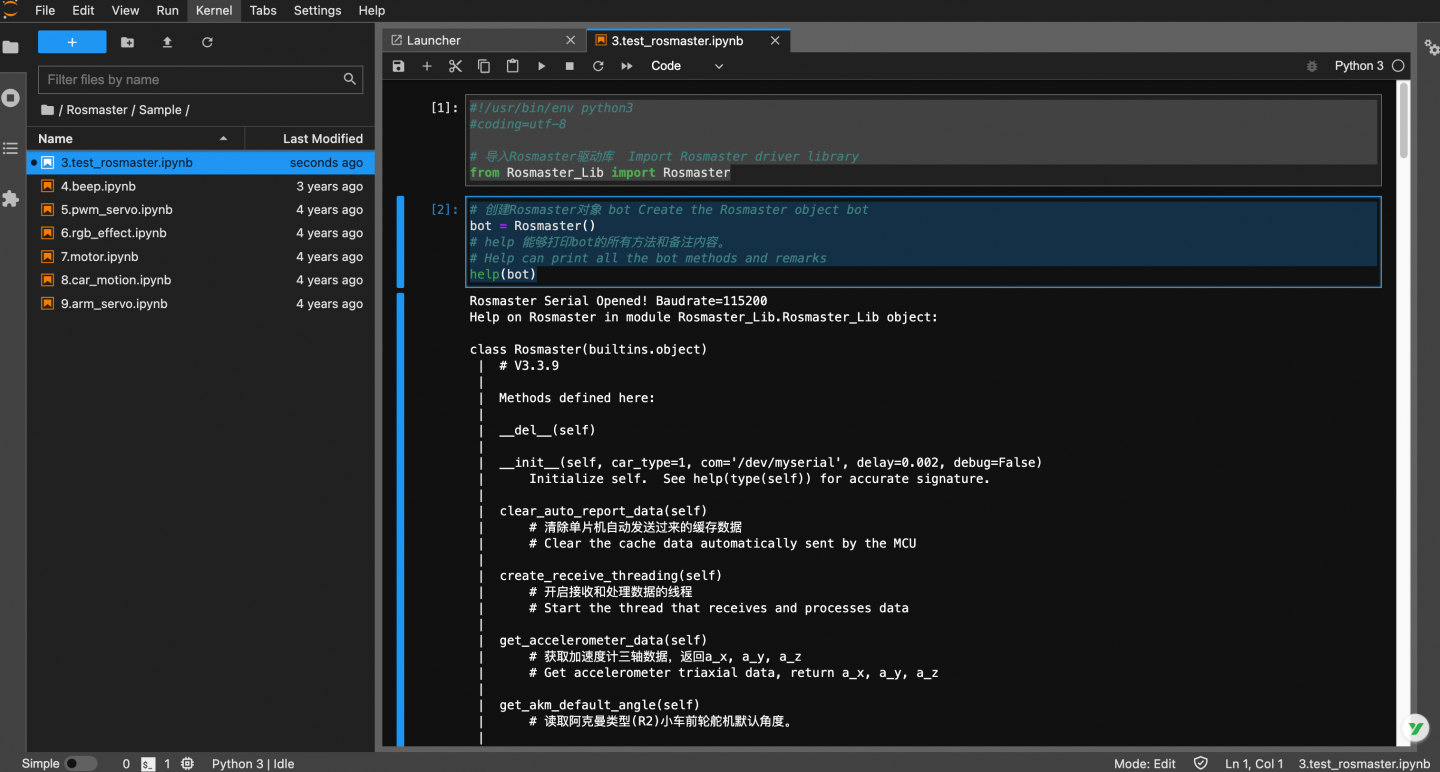
#!/usr/bin/env python3
#coding=utf-8

# 导入Rosmaster驱动库  Import Rosmaster driver library
from Rosmaster_Lib import Rosmaster

# 创建Rosmaster对象 bot Create the Rosmaster object bot
bot = Rosmaster()
# help 能够打印bot的所有方法和备注内容。
# Help can print all the bot methods and remarks
help(bot)
输出:
Rosmaster Serial Opened! Baudrate=115200
Help on Rosmaster in module Rosmaster_Lib.Rosmaster_Lib object:

class Rosmaster(builtins.object)
 |  # V3.3.9
 |
 |  Methods defined here:
 |
 |  __del__(self)
 |
 |  __init__(self, car_type=1, com='/dev/myserial', delay=0.002, debug=False)
 |      Initialize self.  See help(type(self)) for accurate signature.
 |
 |  clear_auto_report_data(self)
 |      # 清除单片机自动发送过来的缓存数据
 |      # Clear the cache data automatically sent by the MCU
 |
 |  create_receive_threading(self)
 |      # 开启接收和处理数据的线程
 |      # Start the thread that receives and processes data
 |
 |  get_accelerometer_data(self)
 |      # 获取加速度计三轴数据,返回a_x, a_y, a_z
 |      # Get accelerometer triaxial data, return a_x, a_y, a_z
 |
 |  get_akm_default_angle(self)
 |      # 读取阿克曼类型(R2)小车前轮舵机默认角度。
 |
 |  get_battery_voltage(self)
 |      # 获取电池电压值
 |      # Get the battery voltage
 |
 |  get_car_type_from_machine(self)
 |      # 获取当前底层小车类型。
 |      # Gets the current car type from machine
 |
 |  get_gyroscope_data(self)
 |      # 获取陀螺仪三轴数据,返回g_x, g_y, g_z
 |      # Get the gyro triaxial data, return g_x, g_y, g_z
 |
 |  get_imu_attitude_data(self, ToAngle=True)
 |      # 获取板子姿态角,返回yaw, roll, pitch
 |      # ToAngle=True返回角度,ToAngle=False返回弧度。
 |
 |  get_magnetometer_data(self)
 |      # 获取磁力计三轴数据,返回m_x, m_y, m_z
 |
 |  get_motion_data(self)
 |      # 获取小车速度,val_vx, val_vy, val_vz
 |      # Get the car speed, val_vx, val_vy, val_vz
 |
 |  get_motion_pid(self)
 |      # 获取小车的运动PID参数, 返回[kp, ki, kd]
 |      # Get the motion PID parameters of the dolly and return [kp, ki, kd]
 |
 |  get_motor_encoder(self)
 |      # 获取四路电机编码器数据
 |      # Obtain data of four-channel motor encoder
 |
 |  get_uart_servo_angle(self, s_id)
 |      # 读取总线舵机的角度,s_id表示要读取的舵机的ID号,s_id=[1-6]
 |      # Read the Angle of the bus steering gear, s_id indicates the ID number of the steering gear to be read, s_id=[1-6]
 |
 |  get_uart_servo_angle_array(self)
 |      # 一次性读取六个舵机的角度[xx, xx, xx, xx, xx, xx],如果某个舵机错误则那一位为-1
 |      # Read the angles of three steering gear [xx, xx, xx, xx, xx, xx] at one time. If one steering gear is wrong, that one is -1
 |
 |  get_uart_servo_value(self, servo_id)
 |      # 读取总线舵机位置参数, servo_id=[1-250], 返回:读到的ID,当前位置参数
 |      # Read bus servo position parameters, servo_id=[1-250], return: read ID, current position parameters
 |
 |  get_version(self)
 |      # 获取底层单片机版本号,如1.1
 |      # Get the underlying microcontroller version number, such as 1.1
 |
 |  reset_car_state(self)
 |      # 重置小车状态,包括停车,关灯,关蜂鸣器
 |      # Reset car status, including parking, lights off, buzzer off
 |
 |  reset_flash_value(self)
 |      # 重置小车flash保存的数据,恢复出厂默认值。
 |      # Reset the car flash saved data, restore the factory default value
 |
 |  set_akm_default_angle(self, angle, forever=False)
 |      # 设置阿克曼类型(R2)小车前轮的默认角度,angle=[60, 120]
 |      # forever=True永久保存,=False临时作用。
 |      # 由于永久保存需要写入芯片flash中,操作时间较长,所以加入delay延迟时间,避免导致单片机丢包的问题。
 |      # 临时作用反应快,单次有效,重启单片后数据不再保持。
 |      # Set the default Angle of akerman type (R2) car front wheel, Angle =[60, 120]
 |      # forever=True for permanent, =False for temporary.
 |      # Since permanent storage needs to be written into the chip flash, which takes a long time to operate, delay is added to avoid packet loss caused by MCU.
 |      # Temporary effect fast response, single effective, data will not be maintained after restarting the single chip
 |
 |  set_akm_steering_angle(self, angle, ctrl_car=False)
 |      # 控制阿克曼类型(R2)小车相对于默认角度的转向角,向左为负数,向右为正数,angle=[-45, 45]
 |      # ctrl_car=False,只控制舵机角度,=True,控制舵机角度同时修改左右电机的速度。
 |      # Control the steering Angle of ackman type (R2) car relative to the default Angle, negative for left and positive for right, Angle =[-45, 45]
 |      # ctrl_car=False, only control the steering gear Angle, =True, control the steering gear Angle and modify the speed of the left and right motors.
 |
 |  set_auto_report_state(self, enable, forever=False)
 |      # 单片机自动返回数据状态位,默认为开启,如果设置关闭会影响部分读取数据功能。
 |      # enable=True,底层扩展板会每隔10毫秒发送一包数据,总共四包不同数据,所以每包数据每40毫秒刷新一次。enable=False,则不发送。
 |      # forever=True永久保存,=False临时作用。
 |      # The MCU automatically returns the data status bit, which is enabled by default. If the switch is closed, the data reading function will be affected.
 |      # enable=True, The underlying expansion board sends four different packets of data every 10 milliseconds, so each packet is refreshed every 40 milliseconds.
 |      # If enable=False, the report is not sent.
 |      # forever=True for permanent, =False for temporary
 |
 |  set_beep(self, on_time)
 |      # 蜂鸣器开关,on_time=0:关闭,on_time=1:一直响,
 |      # on_time>=10:响xx毫秒后自动关闭(on_time是10的倍数)。
 |      # Buzzer switch. On_time =0: the buzzer is off. On_time =1: the buzzer keeps ringing
 |      # On_time >=10: automatically closes after xx milliseconds (on_time is a multiple of 10)
 |
 |  set_car_motion(self, v_x, v_y, v_z)
 |      输入范围 input range:
 |      X3: v_x=[-1.0, 1.0], v_y=[-1.0, 1.0], v_z=[-5, 5]
 |      X3PLUS: v_x=[-0.7, 0.7], v_y=[-0.7, 0.7], v_z=[-3.2, 3.2]
 |      R2/R2L: v_x=[-1.8, 1.8], v_y=[-0.045, 0.045], v_z=[-3, 3]
 |
 |  set_car_run(self, state, speed, adjust=False)
 |      # 控制小车向前、向后、向左、向右等运动。
 |      # state=[0, 7],=0停止,=1前进,=2后退,=3向左,=4向右,=5左旋,=6右旋,=7停车
 |      # speed=[-100, 100],=0停止。
 |      # adjust=True开启陀螺仪辅助运动方向。=False则不开启。(此功能未开通)
 |      # Control the car forward, backward, left, right and other movements.
 |      # State =[0~6],=0 stop,=1 forward,=2 backward,=3 left,=4 right,=5 spin left,=6 spin right
 |      # Speed =[-100, 100], =0 Stop.
 |      # Adjust =True Activate the gyroscope auxiliary motion direction.  If =False, the function is disabled.(This function is not enabled)
 |
 |  set_car_type(self, car_type)
 |      # 设置小车类型
 |      # Set car Type
 |
 |  set_colorful_effect(self, effect, speed=255, parm=255)
 |      # RGB可编程灯带特效展示。
 |      # effect=[0, 6],0:停止灯效,1:流水灯,2:跑马灯,3:呼吸灯,4:渐变灯,5:星光点点,6:电量显示
 |      # speed=[1, 10],数值越小速度变化越快。
 |      # parm,可不填,作为附加参数。用法1:呼吸灯效果传入[0, 6]可修改呼吸灯颜色。
 |      # RGB programmable light band special effects display.
 |      # Effect =[0, 6], 0: stop light effect, 1: running light, 2: running horse light, 3: breathing light, 4: gradient light, 5: starlight, 6: power display
 |      # Speed =[1, 10], the smaller the value, the faster the speed changes
 |      # Parm, left blank, as an additional argument.  Usage 1: The color of breathing lamp can be modified by the effect of breathing lamp [0, 6]
 |
 |  set_colorful_lamps(self, led_id, red, green, blue)
 |      # RGB可编程灯带控制,可单独控制或全体控制,控制前需要先停止RGB灯特效。
 |      # led_id=[0, 13],控制对应编号的RGB灯;led_id=0xFF, 控制所有灯。
 |      # red,green,blue=[0, 255],表示颜色RGB值。
 |      # RGB programmable light belt control, can be controlled individually or collectively, before control need to stop THE RGB light effect.
 |      # Led_id =[0, 13], control the CORRESPONDING numbered RGB lights;  Led_id =0xFF, controls all lights.
 |      # Red,green,blue=[0, 255], indicating the RGB value of the color.
 |
 |  set_motor(self, speed_1, speed_2, speed_3, speed_4)
 |      # 控制电机PWM脉冲,从而控制速度(未使用编码器测速)。speed_X=[-100, 100]
 |      # Control PWM pulse of motor to control speed (speed measurement without encoder). speed_X=[-100, 100]
 |
 |  set_pid_param(self, kp, ki, kd, forever=False)
 |      # PID 参数控制,会影响set_car_motion函数控制小车的运动速度变化情况。默认情况下可不调整。
 |      # kp ki kd = [0, 10.00], 可输入小数。
 |      # forever=True永久保存,=False临时作用。
 |      # 由于永久保存需要写入芯片flash中,操作时间较长,所以加入delay延迟时间,避免导致单片机丢包的问题。
 |      # 临时作用反应快,单次有效,重启单片后数据不再保持。
 |      # PID parameter control will affect the set_CAR_motion function to control the speed change of the car.  This parameter is optional by default.
 |      # KP ki kd = [0, 10.00]
 |      # forever=True for permanent, =False for temporary.
 |      # Since permanent storage needs to be written into the chip flash, which takes a long time to operate, delay is added to avoid packet loss caused by MCU.
 |      # Temporary effect fast response, single effective, data will not be maintained after restarting the single chip
 |
 |  set_pwm_servo(self, servo_id, angle)
 |      # 舵机控制,servo_id:对应ID编号,angle:对应舵机角度值
 |      # servo_id=[1, 4], angle=[0, 180]
 |      # Servo control, servo_id: corresponding, Angle: corresponding servo Angle value
 |
 |  set_pwm_servo_all(self, angle_s1, angle_s2, angle_s3, angle_s4)
 |      # 同时控制四路PWM的角度,angle_sX=[0, 180]
 |      # At the same time control four PWM Angle, angle_sX=[0, 180]
 |
 |  set_uart_servo(self, servo_id, pulse_value, run_time=500)
 |      # 控制总线舵机。servo_id:[1-255],表示要控制的舵机的ID号, id=254时, 控制所有已连接舵机。
 |      # pulse_value=[96,4000]表示舵机要运行到的位置。
 |      # run_time表示运行的时间(ms),时间越短,舵机转动越快。最小为0,最大为2000
 |      # Control bus steering gear.  Servo_id :[1-255], indicating the ID of the steering gear to be controlled. If ID =254, control all connected steering gear.
 |      # pulse_value=[96,4000] indicates the position to which the steering gear will run.
 |      # run_time indicates the running time (ms). The shorter the time, the faster the steering gear rotates.  The minimum value is 0 and the maximum value is 2000
 |
 |  set_uart_servo_angle(self, s_id, s_angle, run_time=500)
 |      # 设置总线舵机角度接口:s_id:[1,6], s_angle: 1-4:[0, 180], 5:[0, 270], 6:[0, 180], 设置舵机要运动到的角度。
 |      # run_time表示运行的时间(ms),时间越短,舵机转动越快。最小为0,最大为2000
 |      # Set bus steering gear Angle interface: s_id:[1,6], s_angle: 1-4:[0, 180], 5:[0, 270], 6:[0, 180], set steering gear to move to the Angle.
 |      # run_time indicates the running time (ms). The shorter the time, the faster the steering gear rotates.  The minimum value is 0 and the maximum value is 2000
 |
 |  set_uart_servo_angle_array(self, angle_s=[90, 90, 90, 90, 90, 180], run_time=500)
 |      # 同时控制机械臂所有舵机的角度。
 |      # Meanwhile, the Angle of all steering gear of the manipulator is controlled
 |
 |  set_uart_servo_ctrl_enable(self, enable)
 |      # 设置机械臂控制开关,enable=True正常发送控制协议,=False不发送控制协议
 |      # Set the control switch of the manipulator. Enable =True Indicates that the control protocol is normally sent; False indicates that the control protocol is not sent
 |
 |  set_uart_servo_id(self, servo_id)
 |      # 设置总线舵机的ID号(谨慎使用),servo_id=[1-250]。
 |      # 运行此函数前请确认只连接一个总线舵机,否则会把所有已连接的总线舵机都设置成同一个ID,造成控制混乱。
 |      # Set the bus servo ID(Use with caution), servo_id=[1-250].
 |      # Before running this function, please confirm that only one bus actuator is connected. Otherwise, all connected bus actuators will be set to the same ID, resulting in confusion of control
 |
 |  set_uart_servo_offset(self, servo_id)
 |      # 设置机械臂的中位偏差,servo_id=0~6, =0全部恢复出厂默认值
 |      # Run the following command to set the mid-bit deviation of the manipulator: servo_id=0 to 6, =0 Restore the factory default values
 |
 |  set_uart_servo_torque(self, enable)
 |      # 关闭/打开总线舵机扭矩力, enable=[0, 1]。
 |      # enable=0:关闭舵机扭矩力,可以用手转动舵机,但命令无法控制转动;
 |      # enable=1:打开扭矩力,命令可以控制转动,不可以用手转动舵机。
 |      # Turn off/on the bus steering gear torque force, enable=[0, 1].
 |      # enable=0: Turn off the torque force of the steering gear, the steering gear can be turned by hand, but the command cannot control the rotation;
 |      # enable=1: Turn on torque force, command can control rotation, can not turn steering gear by hand
 |
 |  ----------------------------------------------------------------------
 |  Data descriptors defined here:
 |
 |  __dict__
 |      dictionary for instance variables (if defined)
 |
 |  __weakref__
 |      list of weak references to the object (if defined)
调用:
# 读取电池电压值 Read the battery voltage
voltage = bot.get_battery_voltage()
print(voltage)
为者常成,行者常至
自由转载-非商用-非衍生-保持署名(创意共享3.0许可证)


